Knowledge Center Search Tips
The Knowledge Center Search lets you customize and refine your search to zero in on the exact content you need.
What you can find with the Knowledge Center search:
- Articles from journals, magazines, and some conferences
- Books sold in the ASQ bookstore
- Standards sold in the ASQ bookstore
- Audio/Video and software products sold in the ASQ bookstore
- Knowledge Center Web pages
- Standards Central Web pages
- Classroom courses, virtual courses, blended courses, and webinars
What you CAN’T search with the Knowledge Center search:
- The overall ASQ Web site - including Division, Section, and Forum Web sites, and discussion boards. To search these items, use the ASQ.org search.
- Conference proceedings, including Division conferences. To search these items use the Articles and Abstracts search.
Make the Most of the Knowledge Center Search
Here’s a description of each field, button, and box.
- Keywords: Search the full text of the content and/or its abstract (if available). For older content and for hard-copy books, the abstract may be the only searchable content.
In title: Checking this box limits the search to the title and subtitle of the content.
In author: Checking this box limits the search only to author of the content.
- When you enter two or more keywords, you will get content containing all the terms, (Example: A search for process capability will return content that contains the word "process" and the word "capability.")
- To search for any of your terms, use "or" to join the keywords. (Example: Searching "fishbone OR Ishikawa" will return content that contains the word "fishbone" AND content that contains the word "Ishikawa."
- To search for an exact phrase, put the phrase in quotation marks (example: "small business").
In assigned keywords: In some cases, “assigned keywords” are more reliable indicators of relevance than full-text keywords because human abstractors, authors and editors have assigned the keywords to that content. For older content, searching by assigned keywords may be the best way to find relevant content. - Topic: Narrow your results to those items that ASQ has tagged with that topic. Topics are assigned by an editor, often at the time the content is published. Selecting more than one topic will return content containing any of the topics selected.
- Industry: Narrow your results to those items that ASQ has tagged with that industry. Industries are assigned by an editor, often at the time the content is published. Selecting more than one industry will return content containing any of the industries selected.
Not all content is tagged with an industry. If you’re not finding what you want with the industry field, try typing the industry in as a keyword. - Content Type: Narrow your results by content type – journals, standards, etc. Selecting more than one content type will return any content containing any of the types selected.
- Journal checkboxes: When searching for article content, you may narrow your results to a particular journal(s) or proceedings.
- Show Only Free: Narrow your results to content that is free to registered visitors and others.
- Date Range: Narrow your results to a specific set of years. The default setting is 2003-present.
- Sort: Sort by relevance, date, title, and content type. The default setting is relevance-descending - showing the most relevant items first.
Relevance is determined by the search engine, It is based on how many times your search term appears in the content (higher frequency = higher relevance) and where your search term(s) appear in the content (in title or near top of document = higher relevance). - Results per page: Determine how many results you prefer to see per page. The default setting is 50 items per page
- Search: Click this button and get your results.
- Reset Search: Remove all of your search criteria, and start over. This button can be especially helpful, since some of the search criteria include long lists that cannot be seen all at once.
- Refine Search: Adjust your query after you get your search results, View your original search form with your current query. You can add or remove criteria as you wish.
- Filtering: By default, we filter out some material from your search results (calendar content which becomes quickly out-of-date, letters to the editor, etc.). To alert you of this filtering, we display this message: “In order to show you the most relevant results, we have omitted some entries. Please click here to view your results with the omitted entries included.” If you wish to see the unfiltered results, click the message and the full list will be displayed.
Searching for a Specific Phrase or Title
To search for an exact phrase, put quotation marks around it. Note that otherwise the search tool ignores common words such as “a”, "the", and "in", because they tend to slow down your search without improving the results.
A Note on Searching for Standards
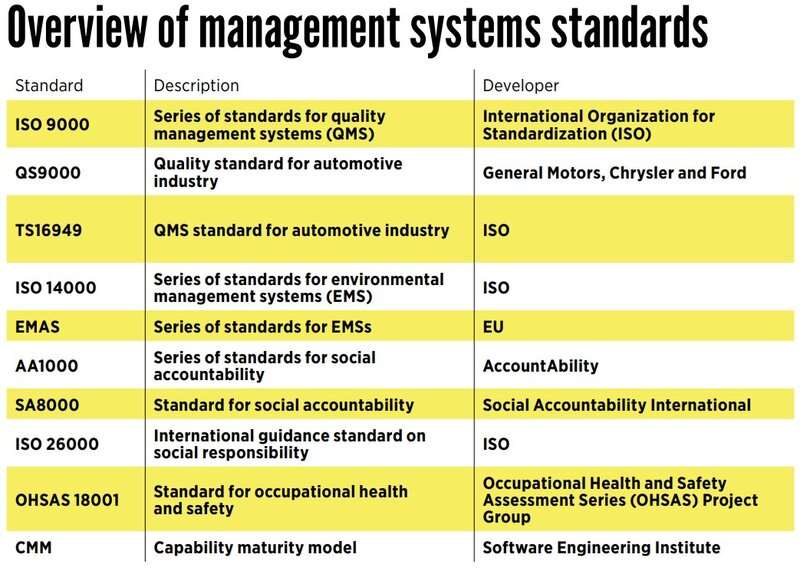
Searching for standards can be difficult. Part of the confusion is because standards are sometimes referred to by their document numbers instead of their titles. For example, people often search for "9001" rather than "Quality Management Systems-Requirements."
Please note that:
- Searching for "9001" will bring this standard into your search results, but you will also get any articles, books, and other types of content that contain the word "9001". As you can imagine, at ASQ, that set of results will include many pieces of content!
- To search for the 9001 standard, or other standards, you may want to narrow your search to "content type=standard" or use words in the title as your search term.
- People in the United States use the American National Standard (ANS) version of ISO 9001, called ISO/ANSI/ASQ Q9001:2000. This ANS has identical text to the ISO version.
For Those Who Plan to Dig Deep
If you intend to plumb the deepest depths of our archives, you may need to adjust your search strategy. After all, our content dates back to the birth of ASQ in 1946.
- Some of our older content may not be available electronically.
- Older content may not use the same language and terms used today. When searching in older content, it may be helpful to use search terms that may have been used at that time. For example, what’s now referred to as "social responsibility" may have been labeled as "ethics" in the past.
- Older content may not always be labeled by topic and/or industry. When searching older content, you may want to just put your topic or industry in the keyword field.
Access
Access to secure content is based on your status as a registered user, ASQ member, or a magazine/journal subscriber.
- To check your access to content, please consult this benefits table.
- What does ASQ mean by "Open Access"? These items are free to all registered visitors. You will be prompted for your login and password, or to create a free account if you don’t already have one.